Showing posts with label google. Show all posts

How To Start A Blog

start a blog

FRIENDS creating a blog is not a tough job. But creating a  good and  successful blog is quite a tough job by a beginner.
Don't worry guys in this post I will share all my experience .

STEP 1- First of all you have to create a blog CLICK HERE to get all information about it.
ideas for blog

STEP 2-But before starting a new blog you have select a topic of your blog . You can check here to get ideas for your blog.
other blogging platform


STEP 3-You can also check other blogging platform .
domain name


STEP 4- Wait Wait please remember your blog name should be simple and you should (if you can) have your own blog domain .It is not a big deal to have a domain but you have to spend money to buy domain name .We spend $50 to purchase www.bloghike.com .
Click here to get information about how to purchase a domain name. 
content

STEP 5- Now after creating your blog, registering your blog domain .You have to find out content for your blog click here to find out how you can do it.
images

STEP 6- Your posts shuould have good title CLICK here to get more information how to have hit post titles.
Your blog post should have images .Images is very important part of blogging . Click here to find out how to choose images for your blog.
traffic and money


STEP 7- Now after following all these steps you should have to do many steps to draw traffic to your blog and earn more and more.

you can use many social networking sites to get traffic 

Facebook

Twitter

Google plus


google adsense

STEP 8- Now if you want to earn Money you have to understand concept of Google adsense or other blogging site.


NOTE-
note

Follow all these  steps to create an awesome blog but this post don't covers all post of my blog so you have to
1 click here to check how to add widgets to your blog.
2 click here to check famous and important apps for blogging.
3 click here to check how to change default bloggers templates.
4 click here to get information about starting a good tech blog.


CONCLUSION -
IN this i try  my best to cover all the basic steps for blogging.
It is just like accessing bloghike from just one post.
PLEASE do share your thoughts with us thanking you... 


Some information about search engines like Google , Web crawlers

Everybody wants his/her blog to be on top pages of the search engines like Google, Yahoo and Bing which are the most popular search engines and they uses their own Algorithms to provide best solution or answers specific search for user based upon the keywords that they have used to search. Algorithms are rules in which we one by one process to rank a website with the keywords that the admin has set. Every search engine ( Google , Bing and yahoo ) has web spider called web crawlers and they crawls your website content / articles according to the title that they has specified , keywords, meta description and the article and then they show the users the best results according to the content ! Google always gives priority to the original content , as well as to an well written content.


website traffic
Website traffic


The Algorithms that the Google has are the great Panda and Penguin which Google uses for ranking of website, the website that has really very good and informative content gets ranked on the #1 position there are a lot of benefits of acquiring this first position in google for the particular keyword like you can get sales and market your product and can make a lot of money out of your blog. Google is the largest search engines nearly each and every friend of mine uses the google search engine to search anything on internet and they get the best result from the google just because of the good algorithms of google search engines so if you want to rank for your keyword on the google or any other search engine than you must do the search engine optimization of your content and blog.


There are two types of search engine optimization techniques -
1. ON page SEO ( includes title ,meta tags , keywords etc )
2. OFF page SEO ( includes backlinks etc )

Easy Ways To Get Content For Your Site

Easy Ways To Get Content For Your Site
Once you've got your website mapped out, know what your important keywords are and have a site structure in min, it's time to start creating some content. If you're blessed with time, writing talent and a firm grasp of your topic, you can write your content yourself. However, if you're short of any of these commodities you might want to consider some more creative methods of sourcing content for your site; in this lesson we are going to cover several easy ways to get content for our site.

#1: Outsourcing

If you have more money than time or literary skills, you could pay someone to write your articles for you; there are a number of websites that connect publishers (like you) with freelance writers - one popular example is Elance.com. Just post a project and writers ("Elancers") will "bid" for the job, offering to write X number of articles for Y dollars per article. At the bottom end of the scale you can spend around $5 per article but, typically, the more you spend the higher the quality of the writing.
  
This can be a hit and miss way to get content for your site; a lot of writers out there (particularly the very cheap ones) don't have English as a first language, or seem to specialize in writing vague, confusing passages that really contribute very little to your site except for bulk. Good writers do exist on these sites, but you may need to try a few before you hit on a winner (and you might need to pay a little more!)
Another option for outsourcing your writing is to hire a student from your local college to write for you - this way you have the benefit of being able to interview your candidates beforehand and discuss the topic with them in person, and (if you're in an English-speaking country) you can generally be sure that their English skills will be reasonable!

#2: Use private label rights resources

Private label rights (PLR) articles are articles that essentially become "yours" once you purchase them: you can edit them, alter them, put your name on them, post them on your website, bind them together into a book and sell it. - the choice is yours; when you buy PLR articles, the author relinquishes almost all rights to the content.
There are a number of ways to get PLR content; usually you will need to either: Purchase a PLR membership from a site like PLRPro.com (very low cost per article, but you don't usually get to choose your topics); Purchase individual packs of PLR articles from non-membership sites (more expensive cost per article, but you get to choose the topic); Or scrounge around on forums for people re-selling packs for cheap (can be very cheap per article, but quality can be very worrying!).
Some PLR sites will also include market research information with their articles, and have chosen the topic based on keyword search volumes or other salient measures.
The good thing with PLR articles is that the quality tends to be considerably higher than articles you get for bottom-dollar on Elance. In fact, you'll see PLR membership sites emphasizing the fact that their writers are native English speakers! This seems like a ridiculous point to advertise, but you will come to appreciate it once you experience the alternative.
There are a few downsides to using PLR articles; for example there will be other people using the articles as well!

#3: Using content from article directories

You can also source a wide range of articles, reviews and other content from free article directories such as ezinearticles.com. With content from article directories you're free to post it on your site, as long as you don't edit the content at all; this includes keeping the author's "bio box" and any links in the content intact.
  There are some obvious and major downsides with this kind of content: Firstly, since you're not allowed to edit this content it will suffer from serious duplicate content penalties from the search engines. Only one site with particular content will receive the credit for that article in the form of a search engine listing, while all other sites with this content will be relegated to the "supplementary results", and often the site that makes it into the search engines is the article directory itself!
Secondly, you're forced to link to whatever sites the author wants to link to in their bio box or within the article itself. Thirdly, you're not able to insert your own affiliate links into the content. Fourth and finally, the quality of these articles is often not all that great. All that hassle for lackluster content. Is it really worth it?
In general, if you're planning to build a site for search engine optimization, or if you're looking for content for your newsletter series, you should steer well clear of article directories. If you're simply looking for something to beef up the back end of your PPC site, this might be an acceptable solution for the meantime. (No guarantees for the future though - the search engines are getting pickier all the time!)

#4: Don't write - talk!

If you're not much of a writer one easy way to create a lot of content for your site, fast, is to get a Dictaphone and record conversations between you and a partner on a particular topic. Often it's much easier to talk about a topic than to write about it, and one hour of conversation can yield around 40 pages of content! You could even find an expert in your field and interview them.
Once you've recorded your conversation you can hire an Elancer (or a student) to transcribe it for you; an hour of talking will typically cost around US$25 for an Elancer to transcribe.
If you're really keen, you could also add the audio to your site with an audio play button. It's a bit of a gimmick, but a lot of people prefer to listen rather than read. It can also add some "real person" credibility to your site. Just be aware that you can't rely solely on audio for all your content, since the search engines can't spider it!

#5: Blogging

If you're able to write an email to your friends or family updating them on what you've been up to, then you're able to blog. Blogging is a lot less formal than article writing, and a lot of affiliates find it much easier. It's also a lot more engaging for your readers since you're able to let your own personality shine through.
The other benefit to blogging is that, by allowing comments on your blog, you can get visitors to your site to help build your content for you! Don't think it gets you out of targeting your keywords though — you should try to work your keywords into your blog posts, particularly in the titles.

CONCLUSION :

In this lesson we have learned a number of approaches to finding content for  website that don't involve pulling articles out of our own head.
Outsourcing to friends, students or through sites.
Pulling articles from article directories .
Recording conversations or interviews and then transcribing them.
Blogging


You can visit  our other post about how to get traffic  through Facebook , whatsapp .

Or you can visit this post to have a visit of whole blog hike.

Or you can also check this post for getting some Idea about post title .

You can also check this post to get some idea about post working in US.


To get information about top trends click here.
Top trends in France.

Add your blog to Google Blog Search

Add your blog to Google Blog Search


If you are a blogger, but not using Google's Blogger (or Blogspot blog), even in that case, you can easily allow your blog to be shown in Google blog Search results. The process is very simple, just visit this page [Google Blog Search Ping Service], and enter your blog's url/address and click on the submit blog button.

Android Latest Version 5.0 Ladoo ,Lollipop ,Licorice, Lemonhead or L.. ?


Android Latest Version 5.0 Ladoo , Lollipop , Licorice , Lemonhead or L.. ?


Different Versions of android - 

  • Alpha "Apple Pie" (1.0)
  • Beta "Petit Four" (1.1)
  • Cupcake (1.5)
  • Doughnut (1.6)
  • Eclair (2.0–2.1)
  • Froyo (2.2–2.2.3)
  • Gingerbread (2.3–2.3.7)
  • Honeycomb (3.0–3.2.6)
  • Ice Cream Sandwich (4.0–4.0.4)
  • Jelly Bean (4.1–4.3.1)
  • KitKat (4.4–4.4.4)
  • Ladoo ,Lollipop ,Licorice, Lemonhead or L.. ?


In what is a change to its usual manner of handling new Android releases, Google has announced a developer preview of the upcoming Android L release. Previous the search giant would unveil a new version of its platform at the I/O event, making it available for download almost immediately.


Now, we've got a developer preview that will only serve for developers to play with and optimize their apps with the actual public release coming later on.
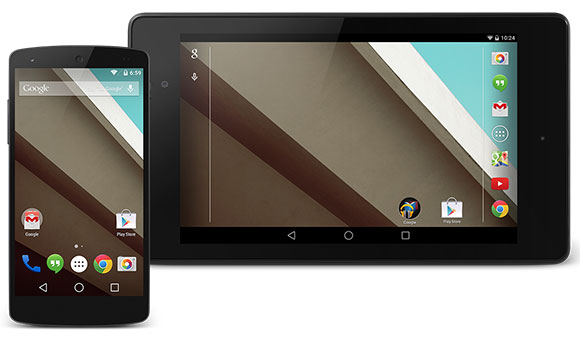
The Android L (final name and version number yet to be confirmed) brings various changes to the UI, with refreshed status bar, dialer and just about every other system apps. Google has also redesigned the transition animations so they look cooler and more natural.
The notifications have been enhanced and are now available on the lockscreen. You can either tap a notification from there and be taken to the app responsible for it, or you can swipe it right off.
The Chrome browser, which has been the default Android browser for some time now has been upgraded as well. It offers a new fluid design with the different parts of its UI changing size to give you easier access to the most relevant options. Its performance has also been tweaked and the GUI rendering has been fixed at 60fps making scrolling around appear extra smooth.
   
The new runtime environment in the L release is ART, launched as an alternative to Dalvik in KitKat. ART allows apps to run faster and is compatible with ARM, x86 and MIPS architectures. In addition to performance gains, it also provides better memory benefits and is supports 64-bit.
   
Performance isn't the only thing Google wants to improve with the L Release. The battery performance is also important and to make it better, Google introduced Project Volta.
There's a new Battery Saver mode, which can tune down the CPU, turn off the phone's radio and as a result extend its power autonomy. On the Nexus 5, for example, this should earns you 90 minutes additional usage time.
   
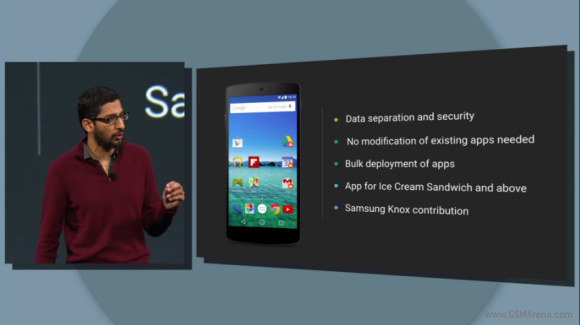
Another major change Google introduced is a separation between personal and work data. No modification to existing apps is needed, Android will keep the data separate and secure. Company IT admins will be able to bulk deploy apps to employees.
Samsung contributed a lot of what it developed with KNOX but the feature will work on devices by any manufacturer. Best of all you don't need Android L, this feature will be brought to any Android 4.0 Ice Cream Sandwich and above.


Android L also unifies the fitness tracker experience into one app, Google Fit (hi, Apple HealthKit). It will pull data from sensors in your phone, your smartwatch and other wearables. Nike Fuelband is one, but Adidas, Motorola, LG, Bais, Polar, RunKeeper, HTC and even Intel will be bringing supported devices.
Google Fit will track steps, your sleep and other health metrics. Apps will be able to request access to this data, but it's up to the user to allow it.


The factory images for the Android L release on the Nexus 5 and Nexus 7 will be released tomorrow for developers to play with them. Over the air updates for end-users will arrive in the Fall.

Credits - GSMArema

EASY AND EFFECTIVE WAY TO GET TRAFFIC FROM GOOGLE PLUS

traffic through google plus


Readers love to read, comment and share posts. This is the real  effective way of getting huge blog traffic. And  We will  use this phenomenon  when sharing our blog posts on Google plus to attract maximum readers and get maximum traffic. 

1. Stylize Your Posts

When writing post for our own blog, we should highlight some text to grab reader’s attention by doing this we are making our blog more attractive . 
We can apply many types of styles  to our texts some of them are given below :
  1. Bold: Use asterisks sign (*) around the text to bold it. Bold keywords there. It’ll  grab viewer’s attention easily and make blog more attractive too.
  2. Italics: Use underscores (_) around the words and italicize them easily to add more style.
  3. Strikeout: Suppose if you are offering a product or discount coupon code, you can easily run a line through old offer (like:20% 30% discount) by putting hyphens (-) around that word or sentence to highlight new offers.
  4. Bullets: Bullets add more value to your content. You can also make use of bullets in your Googl+  posts. Hit space bar, enter a hyphen, and then hit  space bar again. It will works as bullets and you can use it to add lists to your post.

2. Share Images – Not Just the Links

Sharing blog posts links is a most common way to share posts on Social Media sites. You need many changes to attract more readers. When you go to share your new posts on Google+ don’t just share some text and link but also use given patterns to increase viewer’s engagement.
  1. Put a Heading first and apply some formatting to it. It is sometime better to use  Bold.
  2. Add some text of one -two lines that better explain your post and increase reader’s interest to read your post.
  3. Give one line gap and then place your's blog post link.
  4. Now attach a high quality and attention grabbing image with your post. It will surely help you to target wider audience.

3. Choose Targeted Audience To Share

Targeting right audience is most important and effective way to increase interaction and conversion. Google+ allows us to create different circles and we can add different people to different circles to share our posts . Mostly people used to share their posts with Public and there Circles.
I am surprised why they don’t create more circles to target their blog audience. Build relationships with others having interest in your niche. Add all of them into a specific circles and share your posts with them. 

4. Tick “Send Email” For More Attention

Why not to use “Send Email” feature to get more attention of the readers. When you ready to hit share option, put a tick on “Send Email” check box to deliver your G+ post directly to the inbox of the people in this circle.
Note: No doubt sending emails is great to get extra traffic but take care about the circle by which you are sharing. Only send emails to right audience otherwise non-interesting people will get annoy with your emails in their inbox and surely mute you.

5. Target Google Plus Communities

If you are a member of different communities on G+, then you can easily post into those communities directly from your profile, from within the communities itself and using “Share” option at the bottom of your posts.
Click on the share option below your posts and then select the communities in which you want to post.
In this way, you not only save your precious time that you need to invest for posting in communities but also can target large audience to read your latest posts. 
Few More Interesting Tips:
  1. Use Hashtags in your G+ Posts. It’s a smart and quite effective way to target a larger audience. You can also increase your Google+ followers using Hashtags. 
  2. Create videos and upload them to Youtube. Add post link in description of video   and share these videos on Google+. It has 3 benefits:
    • Your Google plus posts will look more attractive.
    • You will get referral traffic from Youtube and Google plus also
    • You can make money by using Youtube Partner Program. Sharing videos and get viewers. Maximum views will give you maximum benifits.
  3. Respond to readers comment on your G+ post by adding their name in the comments body by putting a plus (+) sign in front of their names. It will increase readers engagement on your post and you can get maximum +1s, comments and traffic.

Conclusion

Not only the G+, but all the social media sites have great sources of free and targeted traffic if we come to know their proper use.
Now it’s your turn to share your experience with me. Please tell us how you make use of Google plus or any other social media like facebook ,twitter site to get blog traffic? I will be thankful to you if you share your knowledge with us. Thank you all and Happy Blogging